

Getting Started
Welcome to the FeedPal documentation!
We’ve created a platform to help you create and manage your content.
What is FeedPal?
Section titled “What is FeedPal?”Grow your app and turn your users into fans Feed your blog and mobile app with fresh, engaging content automatically and effortlessly.
- show your articles on your blog
- automatically translate to all the locales you want
- AI assistant that helps you to write your articles
- Schedule your articles to be published at the right time
- Publish your articles on your app with this package
- Notify your users with push notifications when a new article is published
- and more…
How to get started?
Section titled “How to get started?”To get started, you need to create an account on our dashboard (Link will be available soon)
Configure your AI assistant
Section titled “Configure your AI assistant”Before generating content, you need to configure your AI assistant.
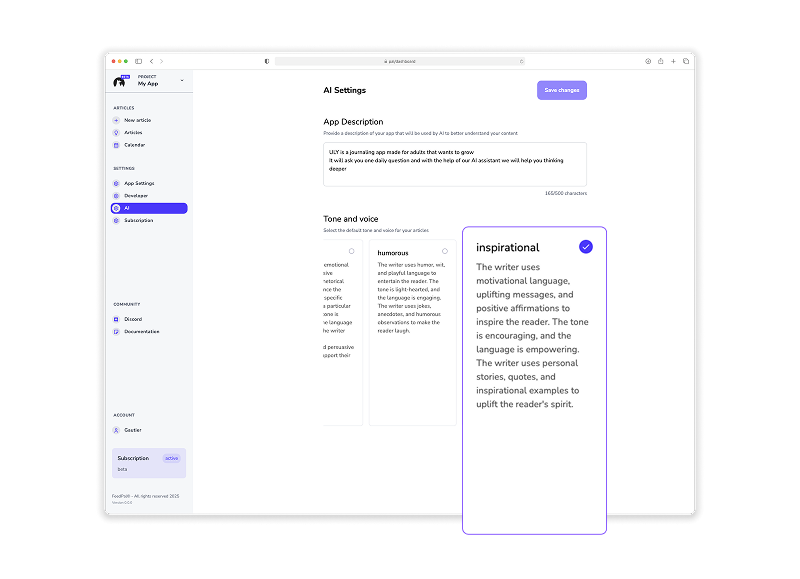
Choose a tone and voice
Section titled “Choose a tone and voice”Go to AI settings and choose a tone and voice for your articles.
Choose a language
Section titled “Choose a language”Go to AI settings and choose a language for your articles.
- Choose a default language for your articles (this is the language that we will use to generate the articles)
- Choose translated languages (this is the languages that we will use to translate your articles)
Setup your product
Section titled “Setup your product”To help our AI assistant to generate better articles, you need to setup your product.
Describe your product in a few words so our AI assistant can understand it. We will use this information to generate articles that are relevant to your product and speak with your brand voice.